

MintyTools
MonteCarloSimulation=MINTY.MONTECARLOSIMULATION()
Buy MintyToolsBuy$69

Monte Carlo Simulation

Recalculate a model many times with random inputs, record the result of each run, and see the average outcome.

  • One of 30 tools in MintyTools
  • Excel 2013–365 on Windows
  • 14-day money-back guarantee

Try it - click the ribbon

Launch Plan.xlsxExcel
B5=B1*(B2-B3)-B4
AB
1Units sold1,000
2Price50
3Unit cost30
4Fixed costs15,000
5Profit5,000
6
7
Model
Ready
Profit looks like 5,000, but units and price are random. One recalculation is one possible outcome.

How it works

Use Monte Carlo Simulation when a model has uncertain inputs, driven by functions such as RAND or RANDBETWEEN, and a single base case hides how much the result can move.

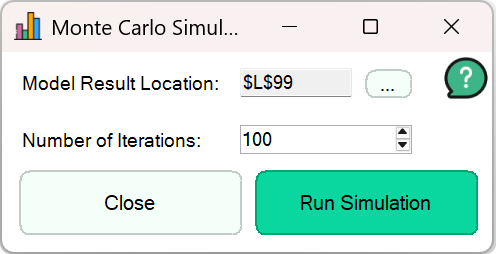
Pick the model result cell and set the number of iterations. MintyTools recalculates the worksheet for each iteration, so every random input draws a new value, and stores the result.

Each iteration is a full recalculation, so every formula built on random values takes part, however many steps sit between the inputs and the result.

When the run finishes, the stored results and their averages are written to a new worksheet.

See where the result lands on average across many runs, instead of relying on one base case.
Good to know: The results are only as good as the ranges behind your random inputs. Large models take longer, because every iteration recalculates the worksheet.

Inside Excel

The real thing.

The demo above is a simplified web version. This is Monte Carlo Simulation running in Excel.

Monte Carlo Simulation dialog with the model result location and number of iterations

Keep exploring

See the whole Modeling sheet or every tool.

MintyTools demo

Video not loading? Watch on YouTube ↗