

MintyTools
DVDropdowns=MINTY.DVDROPDOWNS()
Buy MintyToolsBuy$69

DV Dropdowns

Add data validation dropdowns to several cells and ranges at once, from a typed list or a range of options.

  • One of 30 tools in MintyTools
  • Excel 2013–365 on Windows
  • 14-day money-back guarantee

Try it - click the ribbon

Budget 2026.xlsxExcel
C2:D3Base
ABCD
1FY25FY26FY27
2ScenarioBaseUpside
3Growth %7.5%5.0%
4Revenue1,0001,0751,129
AssumptionsLists
Ready
Two rows of inputs that should only take agreed values. Add a dropdown to each.

How it works

Use DV Dropdowns when inputs should only take agreed values, such as scenarios, rates or regions, across several cells and ranges.

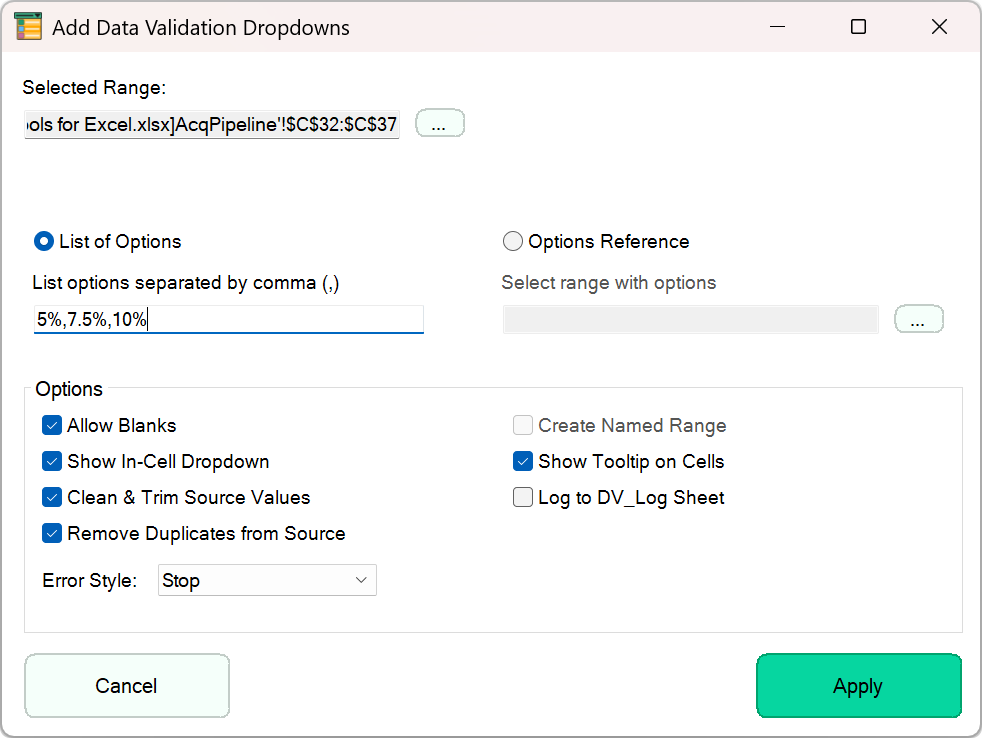
Select the ranges, then type the options separated by commas, or point to a range that holds them, and apply the dropdowns in one step.

Options let you allow blanks, show the in-cell dropdown, clean and trim source values, remove duplicates, show a tooltip on the cells and choose the error style.

Turn on Log to DV_Log Sheet to keep a record of the dropdowns you add.

Inputs stay within the values your model expects, without repeating the Data Validation dialog for every range.
Good to know: As in Excel, data validation controls what is typed into a cell. Values pasted over the cells can still replace the dropdown.

Inside Excel

The real thing.

The demo above is a simplified web version. This is DV Dropdowns running in Excel.

Add Data Validation Dropdowns dialog with a typed list of options and validation settings

Keep exploring

See the whole Modeling sheet or every tool.

MintyTools demo

Video not loading? Watch on YouTube ↗