

MintyTools
GenerateaTableofContents=MINTY.GENERATEATABLEOFCONTENTS()
Buy MintyToolsBuy$69

Generate a Table of Contents

Create a linked workbook index and update it as your worksheets change.

  • One of 30 tools in MintyTools
  • Excel 2013–365 on Windows
  • 14-day money-back guarantee

Try it - click the ribbon

Annual model.xlsxExcel
A1
AB
1
2
3
4
5
6
ContentsSummaryRevenueCostsHeadcountAssumptions
Ready
Six sheets, and more coming. Give readers somewhere to start.

How it works

Use Generate a Table of Contents when a workbook has many worksheets and readers need a clear navigation index.

Create a linked worksheet index that can be refreshed when sheets are added, removed, renamed, or reordered.

The index links to the workbook’s worksheets. You can also add a return link on each worksheet, so readers can get back to the table of contents.

Update the index when the workbook changes to keep navigation useful as the file grows.

Give users a central, maintainable way to move through large Excel workbooks without searching sheet tabs manually.
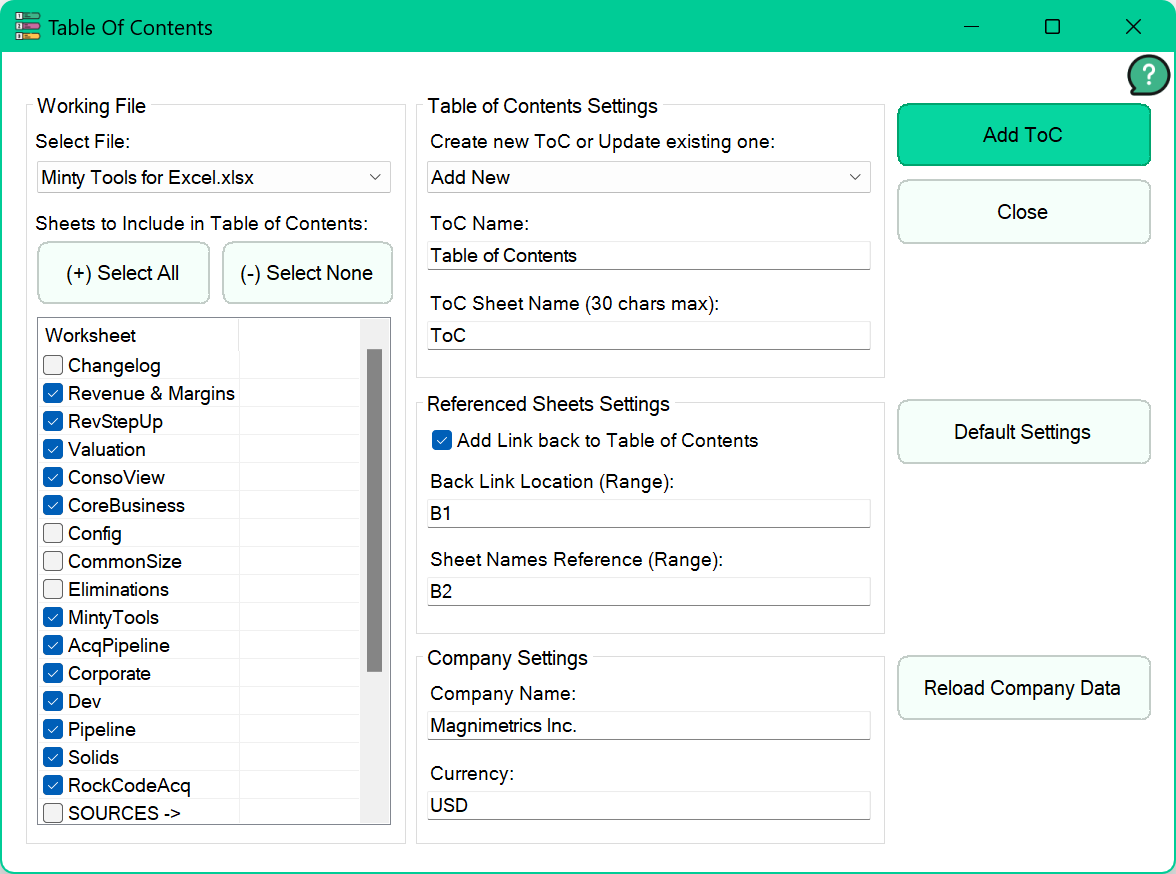
Inside Excel

The real thing.

The demo above is a simplified web version. This is Generate a Table of Contents running in Excel.

Generate a Table of Contents feature working in MintyTools for Excel

Keep exploring

See the whole Formatting sheet or every tool.

MintyTools demo

Video not loading? Watch on YouTube ↗